Showing posts with label LINKS. Show all posts

What is Decentralized Digital Identity in the Web3 World? (And What's the Difference Between It and Your Regular Identity)

What is Decentralized Digital Identity in the Web3 World? (And What's the Difference Between It and Your Regular Identity)

For over 10 years, I've been working in the tech field. I thought I understood everything there is to know about the internet. But it wasn't until recently that I truly understood the meaning of "digital identity," after I started feeling a bit concerned about my personal data. Have you ever felt like everything you do online is being monitored, and that your data isn't really yours? I used to think this was normal, until I discovered a new world that promises us complete control over our identity.

An illustrative drawing showing a person sitting in front of a computer, surrounded by cybersecurity and privacy symbols, holding a golden key that represents control over digital identity.

What is Decentralized Digital Identity in the Web3 World?

Imagine for a moment that your online identity is like your suitcase. In the current web system (Web2), every company (Facebook, Google, Twitter) has a copy of your suitcase. Every time you visit a new site, you open your suitcase to them and give them everything inside. You don't control who sees what, or when.

As for Decentralized Digital Identity (DID) in the Web3 world, it's more like your own private passport that no one can see without your explicit permission. You own this passport, and you alone decide who gets access to any part of your information, when, and for what purpose. It's an identity built on blockchain technology, where there is no "head office" or "government" controlling it. You are the master of your data.

This is the same technology that cryptocurrencies rely on, which we talked about in a previous article about the future of money.

The Difference Between Centralized and Decentralized Identity: The Struggle for Control

Freedom from Centralized Control: An illustration of a person holding a golden key after breaking free from tangled data.

To understand this more clearly, let's compare:

Centralized Identity (What We Use Today): This is the identity you use when you sign up for Facebook, Google, or even when using a government system like "Absher." Your data is stored on the servers of these companies or entities. They are the ones who decide whether to share your data with third parties (for advertising purposes, for example), and they are the ones who control access to it. In a worst-case scenario, if these servers are hacked, all your data is at risk. Here, you are just a "user" of their services.

Decentralized Identity (The Future of Web3): Here, your data is encrypted and distributed across a blockchain network. There is no single entity that controls it. You use a Private Key to access your data, and you alone can grant permission to access a specific part of it. For example, if a website wants to prove you are over 18, you can do so without revealing your full date of birth. This is the true meaning of privacy and control.

Why Is It Important? (And Why Should You Care About It Now?)

This isn't just a complex technical concept; this is a radical shift in our relationship with the internet.

  • Superior Security: Since your data isn't stored in one place, it's very difficult to hack... This significantly reduces the threats we previously discussed in methods for scanning and removing viruses.

  • Complete Privacy: Goodbye to advertising companies that chase you! You are the one who decides who sees which part of your data, and for what purpose. You can browse and interact with complete privacy.

  • E-commerce and Digital Services: In the near future, you will be able to log in to websites, make transactions, and even vote using your decentralized digital identity, all securely and without needing an intermediary.

  • Building Trust: Imagine a world where you don't need to trust companies or governments to protect your data. Trust is built into the technology itself.

Article Conclusion

When I started to delve into understanding decentralized digital identity, I felt a mix of surprise and hope. It's not just a new technology, but a revolution in how we think about privacy and control in our digital lives. Does this mean the end of centralized digital identity? Perhaps not entirely, but it certainly means the future holds stronger and safer options for us.

What do you think? Do you believe that decentralized digital identity will be the future of the internet? Share your thoughts and questions in the comments!

Google News: Your Daily Gateway to Breaking News and Trends

 Google News: Your Daily Gateway to Breaking News and Trends

Google News: Your Daily Gateway to Breaking News and Trends

In an age of information overload, finding reliable and important news has become a difficult task. Thousands of sources crowd your screen, leaving you lost in irrelevant details while missing the stories that truly impact your life. This is where news aggregators come in, and at the forefront is the Google News app, which acts as a compass guiding you through the tumultuous sea of news.

What is the Google News app?

The Google News app is not just a traditional news reader; it is an intelligent platform specifically designed to organize, find, and help you understand the news. The app relies on artificial intelligence algorithms to gather content from thousands of trusted sources around the world.

It then professionally sorts and categorizes it to ultimately provide you with a personalized digest of the news most relevant to your interests, saving you time and effort from browsing various websites.

Features That Make It the Best Choice

The app is distinguished by several features that make it superior to its competitors. The first of these is "Your daily briefing," a daily summary that includes the five most important news stories carefully selected for you. This feature is updated throughout the day to keep you informed of the latest local and global developments.

In addition, there is the "Full Coverage" feature, which allows you to delve into any story with a single click. It shows you multiple sources and different perspectives on the same event, along with a timeline of key events, which helps you understand the complete picture.

The app’s capabilities do not stop there; it has a powerful ability to personalize your experience. You can follow specific topics, news sources, or even geographical locations that you care about. It also integrates local news from your area, keeping you constantly informed of what is happening in your community. These features make the app an ideal choice for anyone interested in staying accurately and reliably informed, without getting lost in the chaos of information.

Why Is Google News a Powerful Tool?

The app's strength lies in its ability to combine advanced technology with high-quality content. It gives you a smooth and comfortable reading experience, with the ability to save news for later reading even while offline.

Its reliable sources, which include thousands of major newspapers and news websites, give it high credibility. The app is an indispensable tool for researchers, journalists, and anyone who wants to follow the news in a professional and organized manner. It brings the world together in one place and presents it in a way that suits your needs.

How to Use Google News and Personalize Your Experience

To get started, you can access the app through the following links:

After installing the app or accessing the website, you can personalize the content to match your interests. Simply search for the topics or sources you want to follow, then click the "Follow" button to ensure they appear in your personalized news feed. You can also activate the "Your daily briefing" feature, which provides you with the most important headlines of the day.

For Content Creators: How to Get Your Articles on Google News?

If you are a blogger or a news website owner, appearing on Google News can bring you thousands of visitors. It does not require a direct application, as Google automatically indexes all news websites, but you can improve your chances of appearing through the "Publisher Center."

To add your site, you must have a Google Search Console and Publisher Center account. After logging into the Publisher Center (https://publishercenter.google.com), add your site and enter its data, making sure to verify its ownership. It is best that your content is exclusive and constantly updated, and that it adheres to the quality standards set by Google.

As a content creator, you can also benefit from other Google tools to discover trending topics before anyone else, just as we explained in our article on how to use Google Trends.

Conclusion

In short, the Google News app represents a perfect solution to the challenge of finding reliable news in a fast-paced and crowded digital world.

Whether you are interested in politics, technology, economy, or any other field, this app ensures you access the content that matters to you, in an organized and smooth manner, with an unparalleled user experience. Try it now and enjoy following your favorite news with ease and accuracy.

Simplify Digital Currency Management with Exwallets

 Simplify Digital Currency Management with Exwallets: A Comprehensive Portfolio for Trading, Investing, and Banking

Exwallets platform is one of the easiest platforms for currency exchange and transfer between currencies, whether cash or electronic currencies

Simplify Digital Currency Management with Exwallets: A Comprehensive Portfolio for Trading, Investing, and Banking 

The platform is characterized by ease of dealing and completely securing transactions among individuals

You can exchange a bit Queen currency in dollars and withdraw the amounts to Paypal, a local bank account, a visa card, Master Card, Western Union, electronic portfolios, electronic banks, and others ...

You can get higher prices than the market It is a platform for a display and a price is offered from the buyer and you choose the highest price

You can transfer money to any electronic bank with the lowest commission

One of the good services that you can get from the platform is a virtual visa for the Internet and shipping it to use for one time and can extract other times

There are also gift cards that you can offer to your friends on any occasion, such as Amazon and others

It is not imperative that you register on the ExWallets

 You can register and complete the verification steps if you want to complete your profile to enjoy other benefits, the most important of which is credibility inside the site

You can profit by referral if you register and get a referral link that invites other people to register on the platform through it and thus get a percentage of their dealings without any effect on them

Once again, we recall that checking the account is not compulsory. It is only my choice that you can need in some special transactions for some currencies

If you like to work, increase profits and exploit the features of the site, you can register by clicking on the registration link

How to use the platform to convert currencies and exchange between banks, governors and currencies with the lowest fees and high safety degree in addition to the high speed in implementing transfers

You start in the first interface by submitting your request to sell a currency or transfer money whatever you want to implement
In our case, we will convert Bitcoin  from your electronic portfolio to money in dollars and send it to perfect money  Bank
Simplify Digital Currency Management with Exwallets: A Comprehensive Portfolio for Trading, Investing, and Banking 
1 Choose the currency to be converted and sent
2 The bank or the future chose the currency and in this case it is Perfect Money
 
3 Choose the currency you want to receive, for example, dollars or euros
Here we see the percentage that will be deducted in detail
After clicking on the request, the student's data is shown like this
Simplify Digital Currency Management with Exwallets: A Comprehensive Portfolio for Trading, Investing, and Banking 
It is indicated to approval and also education on the box that this account is reliable as we see and press the conversion
You are converted to the confirmation page, do the accurate review of the data
 
 
If there is any improper data such as your e -mail, the Perfect Money Bank address, or the quantity to be converted, for example, you can cancel the request by clicking on Cancel
     
Click to pay or as we explained above the iPayd
 
Simplify Digital Currency Management with Exwallets: A Comprehensive Portfolio for Trading, Investing, and Banking


        After moments, the amount paid will reach your account and transfer you directly to the transfer at the same moment, and the process is done with the utmost speed and safety

Simplify Digital Currency Management with Exwallets: A Comprehensive Portfolio for Trading, Investing, and Banking 

As we see in the picture, the money was sent to your account in Perfect Money

If you want to have an account in Perfum Money, you can register from the following link

To register for the currency transfer site, you can register
Also the very reliable wallet

How to become a trend ؟

 In a simple and fast way, you can get the trend when you are the first to keep up with the event, when you enter the mind of the recipient faster than others, when you provide the content that the ordinary and specialized person wants before others, as soon as the user needs the information, the program, or whatever his goal is, you will be in front of him.

How to become a trend

In short, be faster

Google search engine, is the main and first search platform in the world and is an essential reference for many content creators and website owners, who crave attractive titles and topics that people search for, with all their inclinations and interests, and also those who wish to find keywords that raise the level of their sites, blogs and forums.

We must know what is happening around us and what is happening at the same moment?

A Google researcher, he did not lose sight of facilitating matters for users of the giant network across the world and always seeks to connect his fans with indispensable services and also services he may wish for, and he did not find anyone who satisfies his desire to find them, and among those important services that provide information that we mentioned that there are very many interested in them.

google trends service

Yes, it is the great free service, the technology does not stop, so the most famous service now provides a way to show what people are looking for on the Internet and in real time in real time

It provides direct practical information and statistics for people's tendencies and trends now, which is a very important feature for researchers and students of the nature of societies.

If you are a site owner, you will find attractive topics and titles in the easiest way Indeed, users currently want it


So you will get visitors at lightning speed

Your keywords, you can develop and strengthen your site based on what you see from the research

It is one of the seo tools

Your vision and research can be customized You can search by specifying a country and you will know what is going on in it now And analyze the society of that country and study its interests Just select the country from the bottom of the page on the site

With minimal effort, just enter the Google Trends link and see directly what is happening now locally and globally

Here is the Google Trends link

Google Trends

Drawing with artificial intelligence draws you what you think "cool"

 Can you imagine finding a way to transform a drawing in your head into a painting of the highest magnificence and realism?

I wish I had a talent for professional drawing so that I could draw landscapes, distinguished buildings, or even a bridge in a different way.

But I am not one of those who have that talent, and I kept looking for ways to develop that talent, but I got busy with it because of work, lack of time, or laziness, whatever the reason. I could not reach what I wanted, but with the search I found a site that greatly attracted my attention.

The first thing that caught my attention to this site was the basic idea, which is to use artificial intelligence technology to produce the graphics that I have in mind.

I decided to try it before writing about it to you guys

Drawing with artificial intelligence draws you what you think "cool" 

A site produced by the world-renowned giant Nvidia company in the field of premium graphics and graphics cards

This site works to understand the user's thinking when trying to draw something on a blank canvas through the set of tools available on the site such as

brush  the eraser  the pen

And a set of built-in styles on the site, you can choose one of them to be the main background for the work, or you can upload one of the styles you have on your compute

And you can leave that background blank, determined by the site according to the graphics that you draw with your hand to be suitable for the subject of the painting you want and give you a distinct imagination for the final work that you drew

And this is the most important thing in the matter that artificial intelligence technology has provided many facilities in many fields, including industrial, engineering photography and others, and now it has been integrated into art and hobbies as well.

You can develop your skill or make your family and children interested in this field and keep them away from negative games such as violence games and other useless games. On the contrary, they develop aggressive or isolationist motives from the world

But if they are directed to sites such as these and others to understand the meaning of artificial intelligence and its uses and to train on it through hobbies and games that develop their minds and motivate them to innovate, then this is the ultimate goal.

Here is a simple and quick example of how to use the site

Go to the website link at the bottom of the article

It gives you some quick instructions that you can read by clicking on Next

Drawing with artificial intelligence draws you what you think "cool" 

then

Drawing with artificial intelligence draws you what you think "cool" 

And so, every time you press Next, a panel appears

Or you can cancel these instructions and go directly to the drawing by pressing the x

The interface of the site is a drawing board divided into two parts, one of them is milky and the other is empty

First, we must know that we agree to the use agreement as in the picture  

Drawing with artificial intelligence draws you what you think "cool" 

Then you can draw and the drawing will be on the colored part

Then we choose from the side menu on the left what we want to draw

The list is divided into a number of sections, which are four main sections: buildings or floors, spaces and landscapes, and the last section is plants

Each of these sections contains a set of options that appear below

For example, you want to draw a house, we click on the first section, which is buildings, and choose from the bottom a house, and so on

Here we show you a quick experience of the drawing process and the results appear by pressing the right arrow button located at the top of the drawing board

Drawing with artificial intelligence draws you what you think "cool" 

The final result of the drawing is shown on the right

You can save the design before the render or show, as well as save the drawing after imagination as it appears on the site

Of course, graphics and images are protected by intellectual property rights for those who draw them. These are the most important advantages of artificial intelligence technology

Here is the direct link to the site

 Share with us your opinions and what you want us to put on our site for you

Live streaming of Qatar 2022 World Cup matches multiple servers

Live streaming of Qatar 2022 World Cup matches multiple servers

A site we have created specifically for our followers

Live streaming of Qatar 2022 World Cup matches multiple servers 

Trindic is a new site under construction where we offer live streaming from multiple sources

 Today you can always follow all sports games and events live at the same moment

Multiple assets for all devices and internet speeds

Servers are always updated

Teams participating in the 2022 Qatar World Cup

Argentina - Saudi Arabia - Mexico - Poland, England - America - America - Canada - Canada - Canada, Brazil - Canada - Canada, Brazil - Canada - Morocco - Croatia, Brazil - Serbia - Switzerland - Cameroon, Portugal - Ghana - Uruguay - South Korea ,

 In order to obtain a stable connection and the broadcast work properly, use the Google Chrome browser. You can use any browser, but Google Chrome is preferred for not cutting  

Live streaming of Qatar 2022 World Cup matches multiple servers

 When a broadcast interruption occurs, roam between other channels, and if it does not work, do a complete page refresh from the browser above

Choose one of the links

Live broadcast click here

How to create a video online with FlexClip

How to create a video online with FlexClip

How to create a video online with FlexClip

Every user of mobile devices and PCs today is faced with the problem of video editing. This can be done using various tools, such as online service FlexClip, which is suitable for a wide range of devices. It allows you to edit your videos quickly without any editing knowledge.

What is FlexClip online video editor

It is a browser-based video editor that works on almost all browsers like Chrome. FlexClip video editor has great capabilities. It allows you to create presentations with already taken photos, add background music and signatures. You can also record the screen of your computer to create video tutorials. That is, this is an application that will meet the needs of people in all types of professions and amateur activities.

FlexClip Video Maker supports almost all basic editing functions such as rotating, splitting or cropping with high precision. The time range for operations can be set to milliseconds by simply dragging the panel or manually in the settings. If you are looking for a quick way to create a video for YouYube, Facebook, Instagram or Twitter, then you've come to the right place.

How to use FlexClip

1. First, we go to the site, quickly register with your email, Facebook or Gmail and that's it. We are ready to start creating our masterpiece videos, which will become viral on social media.

How to create a video online with FlexClip

It is worth saying the whole interface is quite simple. I think even a primary school student can figure it out. Video editor editing online is now a reality! Making videos, movies and slideshows are as easy as possible. We can quickly create an intro for our YouTube channel or a promotional video for a website.

2. Then we can create the video by click "create by templates," select the desired templates and press the customize button. We will be led to the editor. We can also start from scratch by uploading the videos and photos from our local computer.

How to create a video online with FlexClip

There are many functions on the left of the editor, including Text, Stock media, Background, Music, and Watermark. We can now use our creativity to customize the video.

How to create a video online with FlexClip

3. We can then apply various video editing and enhancement functions, including trimming, removing unwanted segments, format fixing, and more.

The voice recording option is also interesting to make your video more personalized. And the built-in media player allows us to watch the video in real-time to make changes more conveniently.

4. Next up are the Music and Lyrics options. FlexClip lets us import our own audio files or select assets from the music library. We can also add stylish titles and logos.

How to create a video online with FlexClip

5. Once we are satisfied with the work, click preview and play the video. After that, we export the video in the selected quality for the intended purpose. Videos with a resolution of 480p and up to 1 minute are available for download for free. We can also upload it to the social network and catch likes.

How to create a video online with FlexClip

Paid subscriptions offer advanced features. For example, we are allowed to download a 3-minute video with a basic plan, $ 5.99 per month.

Conclusion

If you want an easy-to-use online video editing software, FlexClip Video Maker is a good choice. You can import videos and photos into the editor, which can be enhanced with titles, background music, voice, logos and other options, and finally export them in the format you want. In addition, there is a free plan for everyone to try.

Live broadcasts of all matches exclusively without shredding

Live broadcasts of all matches exclusively without shredding
 
We give you the great website that offers all the football games live
 
In all local leagues and Arab and European leagues
 
Perfect image and multicast for all Internet bouquets
 
And here we're always going to put you on the link of live play-by-play, and follow us
.
Live broadcasts of all matches exclusively without shredding
To follow the news and live broadcast of any match, access can be made through the following link
 
You can watch the live feed from the next link live. 


We wish you a fun watch.


DesignCap Free Graphic Maker Review – Create Social Media and Marketing Graphics Online

DesignCap Free Graphic Maker Review 
 Create Social Media and Marketing Graphics Online

Gone are the days when we had no choice other than Adobe Photoshop or Illustrator 
to meet our graphic design needs. 
Nowadays, a lot of software and tools are available online
 with lots of integrated features that make our work hassle-free.

If you are looking for a graphic design program online,
 you will not find a better site than DesignCap. DesignCap is a great, easy-to-use site 
with many ready-made templates that will help you create your project.

DesignCap has some great features. 
In this article, I will discuss DesignCap and its features, 
and I will also mention how to use the site to create posters, infographics, banners
, and some other graphics.

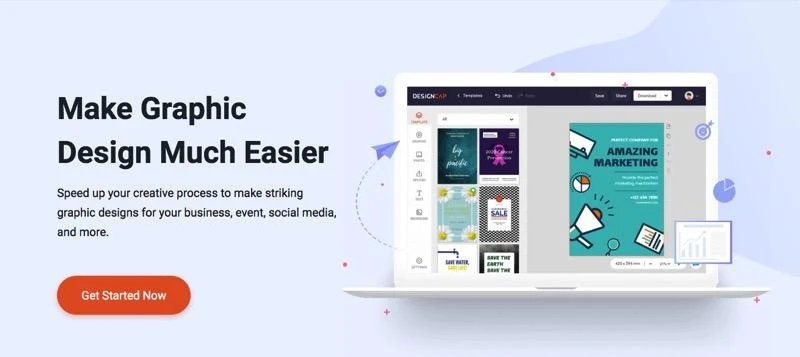
Mac OS:Users:gwh:Desktop:homepage.jpg

What is DesignCap?

DesignCap 
is an online graphic design program 
that helps people and organizations of all levels
 create social media posts, banners, invitation cards, flyers, posters, 
and professional-looking covers.
 DesignCap eliminates the hiring of graphic designers at high financial prices.

With DesignCap,
 the costs of designing and creating professional graphic designs are greatly reduced.
 DesignCap provides users 
with a wide range of ready-made templates and advertising banners 
that they can easily customize and modify using elements such as images, fonts, colors, 
and more.

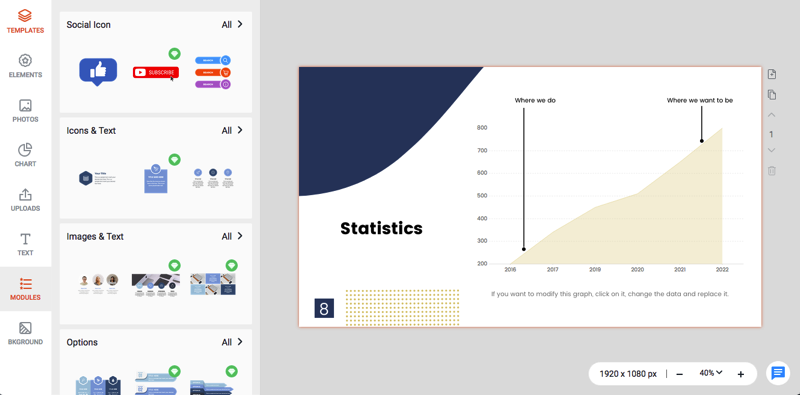
Mac OS:Users:gwh:Desktop:module.png

DesignCap features

    Hundreds of ready-made templates for direct use
    Thousands of images free of copyright
    Upload your photos or import them from Facebook
    Ability to save your images in JPG or PNG format
    Ability to save your project to work on later

How to use DesignCap?

First, visit the DesignCap website www.designcap.com 
to register and create your DesignCap account. 
Click the Sign-Up button at the top right.

Enter your email and choose your password. 
You can also sign in with Facebook or a Google account to sign in faster.
 Don't forget to confirm your account from your email.

After activating and confirming your account, log in to the DesignCap home page. 
Click Get Started Now.

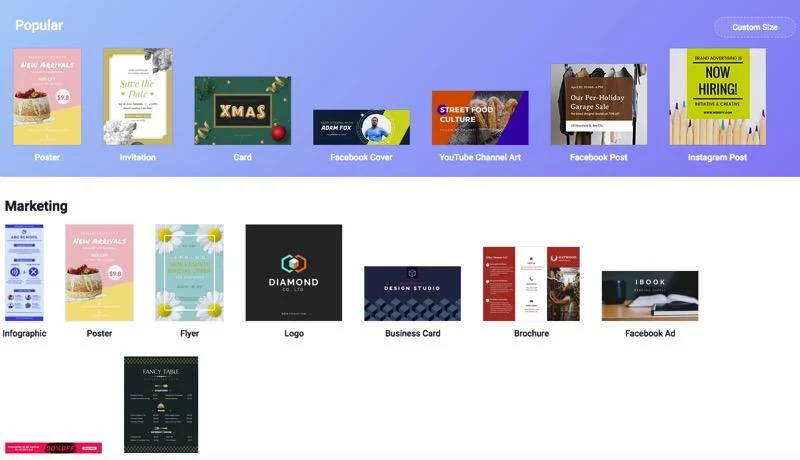
On the next page, 
you will find the Templates section, with thousands of ready-made templates 
that you can add to 
your project. The templates look professional and suitable for most users. 

Mac OS:Users:gwh:Desktop:Design Cap:templates.jpg

Add photos:

You can add royalty-free images in DesignCap. Search for any term, 
and you will get thousands of photos as those images are highly professional.

For each image you add, you can crop and resize the image, duplicate the image,
 rotate and flip it horizontally or vertically, move it up or down layers,
 apply filters to the image,
 adjust opacity, exposure, brightness, contrast, saturation, and hue.
Ready to use templates and the availability of images are my favorite reasons
 to recommend DesignCap, as an online graphic design program.

Add texts:

When you add text, you can choose to enter a title, subtitle, or body text. 
You can change its color and font using the mouse.

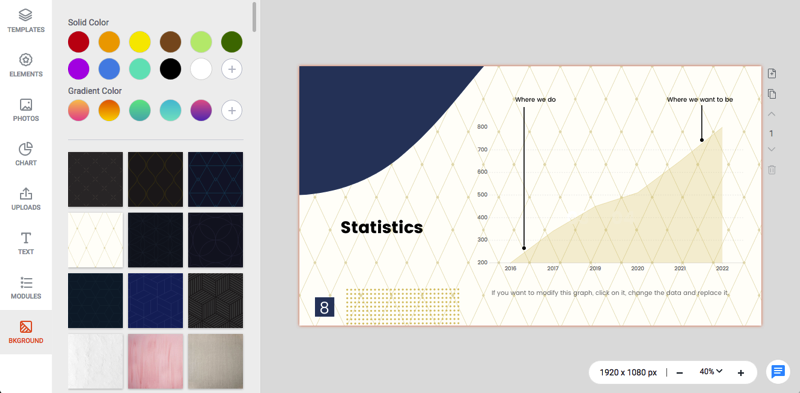
Add background:

You can add the background you want to the design
 by choosing from some predefined backgrounds. Of course, 
you can choose any style and change the color later.

Mac OS:Users:gwh:Desktop:background.png
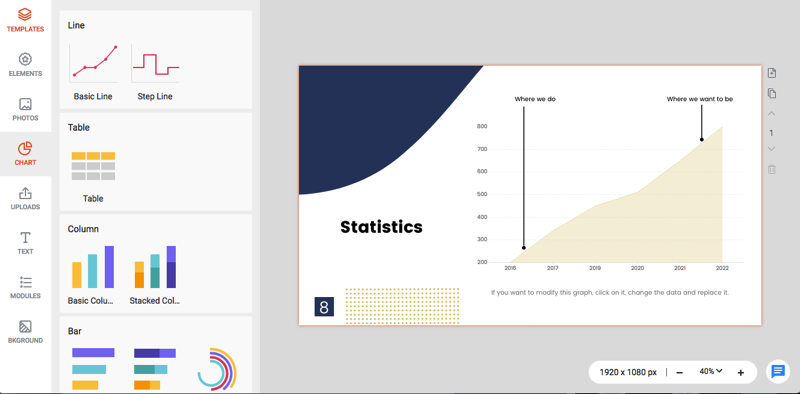
Add charts or modules:

There are many pre-set modules
 such as timelines, diagrams,
 and timelines that greatly combine icons or images with text.
 Also, you will find pre-made line charts, 
table charts, column charts, and more to use. 
With one click, you can apply them to your designs, saving time and effort.

Mac OS:Users:gwh:Desktop:chart.png

Save your designs:

Designcap has multiple ways to save and download your designs.

If you want to download your design,
 you can click the "Download" button at the top and choose either JPG or PNG 
as the download option. If you want a PNG,
 you will be given the option to retain images with a transparent background. 
This option is especially useful if you are creating a logo and need a transparent background.

 Share your designs:

Anyway,
 if you want to share your design on social media, you can do it directly from DesignCap,
 using the Share button.

DesignCap provides photo sharing via Facebook, Twitter, or by email.

DesignCap also allows you to print your design by clicking the Print button.

Save your project:

Finally, if you are only interested in keeping your project for future work, 
you can do so by clicking the Save button.

Once you save your project, you can work on it at any time and complete the modification 
by clicking the My Designs option.

Ultimately, DesignCap is one of the finest tools, 
which enables you to create professional designs. 
DesignCap
 has a wide range of images and ready-made templates that you can use in your project
 to create stunning results. 
If you're looking for a tool to create online graphics, I will recommend DesignCap.